Thursday, May 11, 2017
Share link cara mudah dan cepat transfer file dan aplikasi di android 40x lebih cepat dibanding bluetooth!!
Share link cara mudah dan cepat transfer file dan aplikasi di android 40x lebih cepat dibanding bluetooth!!
 |
| Send smartphone |
 |
| Receive smartphone |
 |
| Peringatan mematikan paket data |
 |
| Memilih file |

 |
| Contoh mengirim game |


- www.opowi.net-
Go to link Download

Monday, March 20, 2017
Sharing Intent in Android app
Sharing Intent in Android app
This function is to invoke the sharing Intent in Android .
public void shareIt(){
 Intent sharingIntent = new Intent(android.content.Intent.ACTION_SEND);
 sharingIntent.setType("text/plain");
 String shareBody = "Apps Taksir Zakat Emas muat turun di Google Store... ";
 shareBody=shareBody+" #zakatkalkulator";
 sharingIntent.putExtra(android.content.Intent.EXTRA_SUBJECT, "Apps Taksir Zakat Emas");
 sharingIntent.putExtra(android.content.Intent.EXTRA_TEXT, shareBody);
 startActivity(Intent.createChooser(sharingIntent, "Kongsikan melalui:"));
 }//end shareIt
Go to link Download
Sunday, March 12, 2017
Search Operation on Android online Database JSON
Search Operation on Android online Database JSON
For the database setup, please refer to http://blog.kerul.net/2014/04/insert-new-record-on-android-online.html
INTRODUCTION
This tutorial will demonstrate how to retrieve an records form an online database. We are using the JSON data format to transfer the database content to the Android client.
 |  |
STEP 1: JSON DATA FORMAT GENERATOR (server-side)
Overview illustration (click to enlarge)
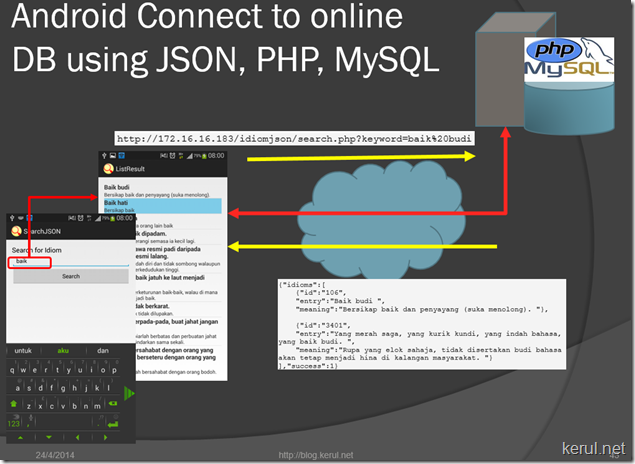
In order to fetch records form the database, we will use the JSON data format generator using the PHP script. Add this file named search.php to the existing folder in the idiomjson folder, in htdocs. (Refer STEP 1 of this article http://blog.kerul.net/2014/04/insert-new-record-on-android-online.html)

search.php
<?php
//search.php
/*
 * Following code will search idiom based on keywords
 */

// array for JSON response
$response = array();

// include connect class
require_once __DIR__ . /connect.php;

// connecting to db
$db = new DB_CONNECT();

$keyword=$_GET["keyword"];
// get idioms based on keyword
/*
$result = mysql_query("SELECT * FROM a_senarai_e WHERE " .
 "MATCH(entri) AGAINST ($keyword ".
 "IN NATURAL LANGUAGE MODE)") or die(mysql_error());
*/

//using LIKE
$result = mysql_query("SELECT * FROM idiomlist WHERE entry LIKE %$keyword% LIMIT 0, 20")
or die(mysql_error());

// check for empty result
if (mysql_num_rows($result) > 0) {
 // looping through all results
 $response["idioms"] = array();

 while ($row = mysql_fetch_array($result)) {
 // temp user array
 $idioms= array();
 $idioms["id"] = $row["id"];
 $idioms["entry"] = $row["entry"];
 $idioms["meaning"] = $row["meaning"];

 // push single idiom array into final response array
 array_push($response["idioms"], $idioms);
 }
 // success
 $response["success"] = 1;

 // echoing JSON response
 echo json_encode($response);
} else {
 // no products found
 $response["success"] = 0;
 $response["message"] = "No idioms found";

 // echo no users JSON
 echo json_encode($response);
}
?>
When the page is called directly from the browser, this is the JSON formatted data you will see.
http://172.16.16.183/idiomjson/search.php?keyword=baik%20budi

{"idioms":[
 {"id":"106",
 "entry":"Baik budi ",
 "meaning":"Bersikap baik dan penyayang (suka menolong). "},

 {"id":"3401",
 "entry":"Yang merah saga, yang kurik kundi, yang indah bahasa, yang baik budi. ",
 "meaning":"Rupa yang elok sahaja, tidak disertakan budi bahasa akan tetap menjadi hina di kalangan masyarakat. "}
],"success":1}
STEP 2: CREATE A NEW PROJECT IN ECLIPSE-ADT (Android client-side)

The UI consist of an EditText with id txtkeyword, and a Button id btnsearch.
This is the UI XML file
<RelativeLayout >="http://schemas.android.com/apk/res/android"
 >="http://schemas.android.com/tools"
 android:layout_width="match_parent"
 android:layout_height="match_parent"
 android:paddingBottom="@dimen/activity_vertical_margin"
 android:paddingLeft="@dimen/activity_horizontal_margin"
 android:paddingRight="@dimen/activity_horizontal_margin"
 android:paddingTop="@dimen/activity_vertical_margin"
 tools:context=".Search" >

 <TableLayout
 android:layout_width="wrap_content"
 android:layout_height="wrap_content"
 android:layout_alignParentBottom="true"
 android:layout_alignParentLeft="true"
 android:layout_alignParentRight="true"
 android:layout_alignParentTop="true" >

 <TableRow
 android:id="@+id/tableRow1"
 android:layout_width="wrap_content"
 android:layout_height="wrap_content" >

 <TextView
 android:id="@+id/textView1"
 android:layout_width="wrap_content"
 android:layout_height="wrap_content"
 android:text="Search for Idiom"
 android:textAppearance="?android:attr/textAppearanceLarge" />

 </TableRow>

 <TableRow
 android:id="@+id/tableRow2"
 android:layout_width="wrap_content"
 android:layout_height="wrap_content" >

 <EditText
 android:id="@+id/txtkeyword"
 android:layout_width="0dp"
 android:layout_height="wrap_content"
 android:layout_weight="1"
 android:ems="10" >

 <requestFocus />
 </EditText>

 </TableRow>

 <TableRow
 android:id="@+id/tableRow3"
 android:layout_width="wrap_content"
 android:layout_height="wrap_content" >

 <Button
 android:id="@+id/btnsearch"
 android:layout_width="0dp"
 android:layout_height="wrap_content"
 android:layout_weight="1"
 android:text="Search" />

 </TableRow>

 <TableRow
 android:id="@+id/tableRow4"
 android:layout_width="wrap_content"
 android:layout_height="wrap_content" >
 </TableRow>
 </TableLayout>

</RelativeLayout>
Search.java
This is only has the UI of the keyword entry. It will be calling another page/screen which will list the idioms that match the search keyword.
package net.kerul.searchjson;//change this to ur package name

import android.os.Bundle;
import android.app.Activity;
import android.content.Intent;
import android.view.Menu;
import android.view.View;
import android.view.View.OnClickListener;
import android.widget.Button;
import android.widget.EditText;

public class Search extends Activity implements OnClickListener {
 private EditText txtkeyword;
 private Button btnsearch;

 @Override
 protected void onCreate(Bundle savedInstanceState) {
 super.onCreate(savedInstanceState);
 setContentView(R.layout.activity_search);

 //link to UI
 txtkeyword=(EditText)findViewById(R.id.txtkeyword);
 btnsearch=(Button)findViewById(R.id.btnsearch);
 btnsearch.setOnClickListener(this);
 }
 @Override
 public void onClick(View v) {
 if(v.getId()==R.id.btnsearch){
 Intent searchIntent = new Intent(this, Search.class);
 //send the keyword to the next screen
 searchIntent.putExtra("key",txtkeyword.getText().toString());
 //call the screen for listing
 startActivity(searchIntent);
 }

 }

 @Override
 public boolean onCreateOptionsMenu(Menu menu) {
 // Inflate the menu; this adds items to the action bar if it is present.
 getMenuInflater().inflate(R.menu.search, menu);
 return true;
 }

}
Create the ListView named ListResult activity to handle the result listing.
To create a new activity, right click on project and choose New –> Other…
Use the name ListResult for the new activity.
 |  |
inside this UI XML file copy paste the following XML code. It must have ListView with the id named list.
activity_list_result.xml
<RelativeLayout >="http://schemas.android.com/apk/res/android"
 >="http://schemas.android.com/tools"
 android:layout_width="match_parent"
 android:layout_height="match_parent"
 android:paddingBottom="@dimen/activity_vertical_margin"
 android:paddingLeft="@dimen/activity_horizontal_margin"
 android:paddingRight="@dimen/activity_horizontal_margin"
 android:paddingTop="@dimen/activity_vertical_margin"
 tools:context=".ListResult" >

 <!-- Main ListView
 Always give id value as list(@android:id/list)
 -->
 <ListView
 android:id="@android:id/list"
 android:layout_width="fill_parent"
 android:layout_height="wrap_content"/>

</RelativeLayout>
Then add another XML file in the layout folder, by right clicking on the layout folder->New->Android XML File. This is to show the record. It will be reiterated for all records successfully fetched. It must be named list_view.xml; it will be called by activity_list_result.xml to populate the idiom data.


list_view.xml
<?xml version="1.0" encoding="utf-8"?>
<LinearLayout >="http://schemas.android.com/apk/res/android"
 android:layout_width="fill_parent"
 android:layout_height="wrap_content"
 android:orientation="vertical" >

 <!-- Idioms id will be HIDDEN - used to pass to other activity -->
 <TextView
 android:id="@+id/id"
 android:layout_width="fill_parent"
 android:layout_height="wrap_content"
 android:visibility="gone" />

 <!-- Entry data display -->
 <TextView
 android:id="@+id/entry"
 android:layout_width="fill_parent"
 android:layout_height="wrap_content"
 android:textSize="17dip"
 android:textStyle="bold" />
 <!-- the Meaning data display -->
 <TextView
 android:id="@+id/meaning"
 android:layout_width="fill_parent"
 android:layout_height="wrap_content"
 android:textSize="14dip" />

</LinearLayout>
and the ListResult.java file to do the fetch record and display processes.
ListResult.java
package net.kerul.searchjson;//change to your package name

import java.util.ArrayList;
import java.util.HashMap;
import java.util.List;

import org.apache.http.NameValuePair;
import org.apache.http.message.BasicNameValuePair;
import org.json.JSONArray;
import org.json.JSONException;
import org.json.JSONObject;

import android.app.ListActivity;
import android.app.ProgressDialog;
import android.content.Intent;
import android.os.AsyncTask;
import android.os.Bundle;
import android.util.Log;
import android.view.View;
import android.widget.AdapterView;
import android.widget.AdapterView.OnItemClickListener;
import android.widget.ListAdapter;
import android.widget.ListView;
import android.widget.SimpleAdapter;
import android.widget.TextView;
import android.widget.Toast;

public class ListResult extends ListActivity {

 // Progress Dialog
 private ProgressDialog pDialog;

 // Creating JSON Parser object
 JSONParser jParser = new JSONParser();

 ArrayList<HashMap<String, String>> idiomsList;

 // url to get the idiom list
 private static String url_search = "http://172.16.16.183/idiomjson/search.php";

 // JSON Node names
 private static final String TAG_SUCCESS = "success";
 private static final String TAG_IDIOMS = "idioms";
 private static final String TAG_ID = "id";
 private static final String TAG_ENTRY = "entry";
 private static final String TAG_MEANING = "meaning";

 // products JSONArray
 JSONArray idioms = null;
 //search key value
 public String searchkey;

 @Override
 public void onCreate(Bundle savedInstanceState) {
 super.onCreate(savedInstanceState);
 setContentView(R.layout.activity_list_result);
 Intent myIntent = getIntent();
 // gets the arguments from previously created intent
 searchkey = myIntent.getStringExtra("keyword");

 // Hashmap for ListView
 idiomsList = new ArrayList<HashMap<String, String>>();

 // Loading idioms in Background ThreadGo to link Download
Saturday, February 25, 2017
Revision CNN App for Android Phones apk
Revision CNN App for Android Phones apk
CNN App for Android Phones apk Revision News & Magazines 1.4.1 Download 1380 Free Paid Android Apps and Games APK 2013 iHackSo The link for the games and apps for the android phone can be found below.,In the latest, the APK for the devices Camera app has been released into the wild, Download Moto X Camera App APK For Any Android Phone.,APK Android Apps Free Download APK Android App. APK Android App Download Free Smart Phone Apps Link. Home; Applications. Books and Reference Business,Adam shows how to install Android APK App files to your mobile device with touch abilities for better application testing before you attempt to give it ,Daily update the best free download apk android including apps, games, ebook, themes, and many more. Compatible with all android devices,Skype Android App Download Apk. Enter your email address to receive new apps, cool apps, android phones and other cool freebies: Categories. Apps on Amazon;,Best directory of FREE Android freeware, apps, software, applications, utilities and games for Google Android phones. Download APK files.,Android Apk Free Downloads Of Android Software, Games, Themes, Applications,Google has just pulled 21 popular free apps from the Android Market. According to the company, the apps are malware aimed at getting root access to the ,Select your device below to download your free CNN app. PHONES. Android powered phones - Global; BlackBerry - Z10

CNN Mobile
Select your device below to download your free CNN app. PHONES. Android powered phones - Global; BlackBerry - Z10
Google pulls 21 apps in Android malware scare - CNN.com
Google has just pulled 21 popular free apps from the Android Market. According to the company, the apps are malware aimed at getting root access to the
Android Apk Free
Android Apk Free Downloads Of Android Software, Games, Themes, Applications
freeapk.com - Android Freeware | Android Free Apps | Best Apps For ...
Best directory of FREE Android freeware, apps, software, applications, utilities and games for Google Android phones. Download APK files.
Download Apps For Android | Download Android Apps
Skype Android App Download Apk. Enter your email address to receive new apps, cool apps, android phones and other cool freebies: Categories. Apps on Amazon;
Apk Apps for Android
Daily update the best free download apk android including apps, games, ebook, themes, and many more. Compatible with all android devices
How to Install Android APK App Files Test On Mobile Phone or ...
Adam shows how to install Android APK App files to your mobile device with touch abilities for better application testing before you attempt to give it
APK Android App - Download Android Apps
APK Android Apps Free Download APK Android App. APK Android App Download Free Smart Phone Apps Link. Home; Applications. Books and Reference Business
Download Moto X Camera App APK For Any Android Phone | Redmond Pie
In the latest, the APK for the devices Camera app has been released into the wild, Download Moto X Camera App APK For Any Android Phone.
1380 Free Paid Android Apps and Games APK 2013 - YouTube
1380 Free Paid Android Apps and Games APK 2013 iHackSo The link for the games and apps for the android phone can be found below.


Go to link Download
Wednesday, February 22, 2017
Review of Plex for Android apk
Review of Plex for Android apk
Plex for Android apk Review of Media & Video Varies with device Last Update Top android Games themes Paid apks for free download apktop site flash custom rom top android market applications download app top 10 android,Instalación de Plex desde apk en servidor remoto, en un Mele A2000 con Android 2.3.4,ePSXe for Android is a Playstation emulator (PSX and PSOne). It is a port from the famous ePSXe for PC. ePSXe provides high compatibility and good speed.,Most impressible action game tested on galaxy mini.. with its APK and data. download and enjoy hero of Sparta on your QVGA android device. GAME FIX,Today Calendar Widgets APK FULL Download Requirements: 4.0.3 and up Overview: Today is a minimal, transparent agenda widget for Android. Today Calendar ,That said there will be a another Zoom mode which is now in the Plex for Android release that will be coming soon to the Google TV. Happy Holidays!,Almost a year ago, I wrote a post introducing Plex for Windows Phone. In that post, I had some harsh words for Android. Turns out a lot has changed since then.,Connect from Plex for Android. Go to Settings. and you can get the apk separately if your device doesnt have access to the market ,Requirements: Android OS 2.1+ Overview: Plex for Android allows you to browse and play your video, photos, and music right on your Android device, streamed from Plex ,Plex for Android 2.5.4.3 APK Free Download Android App. Welcome to Plex! Plex in a nutshell is a media platform that runs on Macs, PCs and Linux that is capable of
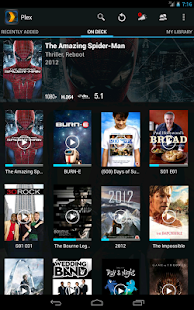
Plex for Android 2.5.4.3 APK Free Download - APK Stall
Plex for Android 2.5.4.3 APK Free Download Android App. Welcome to Plex! Plex in a nutshell is a media platform that runs on Macs, PCs and Linux that is capable of
Plex for Android v2.2.2.8 Apk App ~ Free Android Mobiles Apk Apps ...
Requirements: Android OS 2.1+ Overview: Plex for Android allows you to browse and play your video, photos, and music right on your Android device, streamed from Plex
Android FAQ - Plex - Plex - A Complete Media Solution
Connect from Plex for Android. Go to Settings. and you can get the apk separately if your device doesnt have access to the market
Plex » Introducing the new Plex for Android
Almost a year ago, I wrote a post introducing Plex for Windows Phone. In that post, I had some harsh words for Android. Turns out a lot has changed since then.
Darrins Blog » Introducing Plex for Google TV
That said there will be a another Zoom mode which is now in the Plex for Android release that will be coming soon to the Google TV. Happy Holidays!
Download Free APK
Today Calendar Widgets APK FULL Download Requirements: 4.0.3 and up Overview: Today is a minimal, transparent agenda widget for Android. Today Calendar
Hero Of Sparta HD ARMv6 APK+DATA | GALAXY MINI CLUB
Most impressible action game tested on galaxy mini.. with its APK and data. download and enjoy hero of Sparta on your QVGA android device. GAME FIX
ePSXe for Android v1.8.9 Download Android Apk App | Android free files
ePSXe for Android is a Playstation emulator (PSX and PSOne). It is a port from the famous ePSXe for PC. ePSXe provides high compatibility and good speed.
Instalar Plex en Mele A1000/A2000 - YouTube
Instalación de Plex desde apk en servidor remoto, en un Mele A2000 con Android 2.3.4
Apkpedia | Download Free Full Android Apps, Android Games, Android ...
Top android Games themes Paid apks for free download apktop site flash custom rom top android market applications download app top 10 android

Go to link Download
Friday, December 30, 2016
Sample Android app with Titanium Mobile
Sample Android app with Titanium Mobile
I have been trying to find out various cross platform mobile application development framework. There are couple of them which includes PhoneGap and Titanium Mobile.
These frameworks allows web technologies like html, css and javascript to be used as application development framework for various mobile platforms like android, ios, blackberry etc. Lets try out Titanium Mobile and a sample android app using it.
I have started with installing Android SDK. After installing the base I have to install various packages available for download and install through the Android SDK Manager. We need a target SDK Platform Android, 1.6 API 4. Its being used by Titanium Mobile as default target platform. (not sure about support of other platforms).
We are now ready with The Android SDK, lets download Titanium Developer. You have to register with appcelerator website if you wants to use Titanium Developer. 
After login, you would be in the front page of Titanium Developer. Select "New Project" and fill all the basic details related to your project as asked. The project type in our case is "mobile". When You create your project, the basic stub for holding various platform related details is auto-generated. You can find out various files including tiapp.xml, manifest and folder named "Resources" in the Project Directory you provided.
The main purpose of "Titanium Developer" IDE is for building and deploying your application. It helps you with all packaging related stuffs. You can launch the newly created application from "Run Emulator" tab.
Your actual code files should be placed into "Resources" folder. The auto-generated sample "app.js" is found in the same directory. These are the files included and compiled by Titanium to generate native binaries.
Your next question is: How Titanium generates native binaries from javascript code ?? Please check reply of Jeff Haynie for the same question here. Also Checkout this.
So back to the sample project. We can now go to "Run Emulator" tab and launch the application. Titanium automatically creates a new Virtual device depending on the configuration of your project, installs your app and launches it. Once your app is are relatively stable you can directly try that out with your android phone connected to the computer.
Go to link Download
Tuesday, December 6, 2016
Share WiFi Internet Laptop to Android Mobile Tutorial
Share WiFi Internet Laptop to Android Mobile Tutorial
You Can Wirelessly Share WiFi Internet Connection (Wifi, Lan, Dial-up, Modem) to Android Mobile. Make your laptop or Pc as a Hotspot . At the same time user having internet at Android mobile. So, Here is the very simple method to share internet via laptop wifi to any Android device.

Requirements for Share:
- PC / Laptop with Inetnet Connection.
- PC with WIFI Dongle / Laptop with WIFI Enabled.
- Android Mobile with Enabled Wifi
- Latest Version of Virtual Wifi Router Application
Step-1
Step-2
Step-3
Step-4
- Write the Hotspot Name
- Choose a Hotspot Password
- Select the Internet Connection You Want to Share From the Option (Share Internet)
- Click on Start
Go to link Download
Sunday, December 4, 2016
Security Antivirus Premier APK Free Download For Android
Security Antivirus Premier APK Free Download For Android
Security & Antivirus Premier APK Free Download by mcAfee (Internet Security) is a super-class Android application that is filled with lots of features for perfect protection.

Mobile Security & Antivirus APK Cracked App For Android Free Download Full Version
It includes some dynamic functions as well.Mobile Security & Antivirus APK Features:
- Memory Cleanup for freeing unwanted RAM and makes device speedier.
- On the other hand, it uses Wi-Fi Security for protecting ARP spoofing attacks and unsafe Wi-Fi networks as well.
- With the help of function of Battery Optimizer, you can estimate battery life and can make device live longer.
- Download Lookout Premium APK Cracked Free
- Free Download Norton Mobile Security App For Android
- Antivirus Free Download For Mobile Security
- Download Antivirus Booster And Cleaner App Free
Go to link Download
Saturday, November 19, 2016
Remote Desktop Ubuntu dari Tablet HP Android
Remote Desktop Ubuntu dari Tablet HP Android


Go to link Download
Wednesday, November 9, 2016
S5660XXKS5 Android 2 3 5 Gingerbrd ROM for Galaxy Gio S5660
S5660XXKS5 Android 2 3 5 Gingerbrd ROM for Galaxy Gio S5660
A new firmware for Galaxy Gio S5660 with build S5660XXKS5 this ROM is packed in Android 2.3.5 Gingerbrd with a build date of October 15, 2011. The CSC file is SER - S5660SERKS1, which is the default firmware for Russia. But anyway a global version of Galaxy Gio may also use this ROM, the only twk is to change the default language which is in Russian to any Europn region
Go to link Download
Monday, October 31, 2016
Samsung Galaxy S3 Android and S5 Android Lollipop Firmware Free Download
Samsung Galaxy S3 Android and S5 Android Lollipop Firmware Free Download
Samsung Galaxy S3 Android and S5 Android Lollipop Firmware:

Go to link Download
Tuesday, October 4, 2016
Setting Proxy Wi fi Di Ponsel Android
Setting Proxy Wi fi Di Ponsel Android
- Masuk ke menu Settings.
- Pilih Wireless and networks.
- Kemudian pilih Wi-Fi settings. Pada bagian ini tekan tombol Menu di ponsel. Kemudian kita akan mendapatkan menu Scan dan Advanced.
- Pilih menu Advanced.
- Di menu tersebut akan kita temui menu Proxy dan Port. Masukan proxy dan port-nya.
Go to link Download
Saturday, September 24, 2016
Running Android Apps on BlueStacks–Apps player for PC Windows
Running Android Apps on BlueStacks–Apps player for PC Windows
This application also useful for non-developer, to play Android apps on their PC. I personally use PULSE on the BlueStacks.
Find out how to win a copy of Instant BlueStacks.  |
STEP1: Installing BlueStacks App Player
Your PC needs more than
Download the installer here http://bluestacks.com/

After the download completes, find the installer file and execute.

 Click Next.
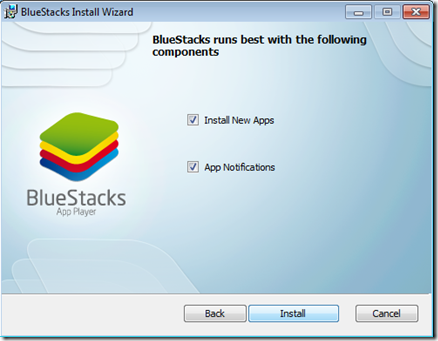 Choose Install.
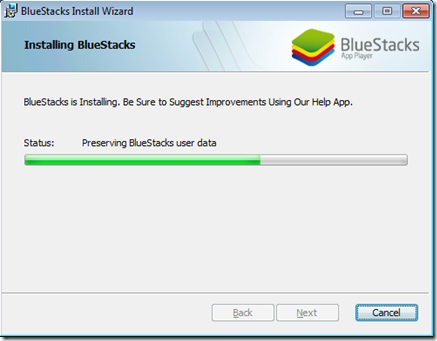 Wait for a while.
 Find the “Start BleuStacks” on the Windows button
 Wait again for the BlueStacks App Player to load.
 Your email and click Next.
  Ready to play an Android Apps.
STEP 2: Running your APK
If you do not any APK file, try download this –> http://bit.ly/m-mathuratkuis .
After the download finish just double click (alMathurat bersama Ustaz Don.apk). Your Windows supposedly recognise the APK file and associate it to the BlueStack App Player.


On the home panel of BlueStacks app player, you’ll see the icon of the app you just installed. Click it.

And, voila!!! Have fun…
Should you’d like to play your own Android apps, try locate the APK file in the bin folder of your Android project. Normally all the project folders are in the folder called workspace.

For more information about BlueStacks, you may refer to this good from my friend Gary Judge titled Instant Bluestacks from PacktPub.com. Find out how to win a copy of Instant BlueStacks.
Go to link Download