Sunday, February 26, 2017
Running Windows applications in the Linux with Crossover
Running Windows applications in the Linux with Crossover
With applications such as this crossover linux mania can install a variety of popular applications in the Windows operating system to Linux in the audiences, not only the application, but plugins, games and popular games you can install windows in linux, without the need for the license is owned by Microsoft Operating System. Crossover has a user-friendly display, easy to use, and make the installation process the applications in the windows linux become very easy and fast. After the installation process is complete application windows are directly integrated with the desktop manager such as KDE or Gnome.
Once the case with the plugin in the windows are truly to be integrated with the browser in linux, of course, with brokers cross over this. The author think this crossover linux feasible in the attempt. :
Applications that have been in support include:
- Microsoft Office 2007, 2003, XP, 2000 and 97
- Microsoft Word
- Microsoft Excel
- Microsoft PowerPoint
- Microsoft Outlook
- Microsoft Access
- Microsoft Internet Explorer 6
- Microsoft Project
- Adobe Photoshop
- Microsoft Visio
- Lotus Notes 5.0 and 6.5.1
- Quicken
- FrameMaker
- Various Web Browser Plugins
- QuickTime
- Shockwave Director
- Windows Media Player 6.4
- and more ...
Cross over linux can download here ...
source: ilmuwebsite.com
Go to link Download

Monday, January 2, 2017
Running Windows inside your Ubuntu 7 10 installation
Running Windows inside your Ubuntu 7 10 installation
For people making jump from Windows to Linux the biggest problem is adjusting to new environment and applications , now even though these days really good open source alternatives to applications on Windows platform are available but still many people prefer using Windows applications .
Now ,If you want to run Windows application on your Ubuntu installation there are two options available
- You can use a virtualization software(like Qemu , Virualbox , VMware , bochs etc) which allows you to run full fledged installation of Microsoft Windows inside your Ubuntu desktop
- Or you might use a application layer called wine to run Windows application natively on Linux . While most of the people would prefer wine to run their windows application because it does not require one to have a licensed copy of windows , however application support in wine is
still patchy with some applications working flawlessly and some application not working at all . So well that leaves us to virtualization softwares .
Some of such popular applications available on Linux platform are : Innotek VirtualBox , Qemu , Vmware , Win4Lin and Bochs .
In This article we discuss how to install Microsoft Windows XP inside Ubuntu using QEmu and Virtualbox .
Qemu : - Qemu is a processor emulator created by Fabrice Bellard , it allows full virtualization of a system inside another thus paving way of allowing one operating system to run inside another operating system . Qemu is open source and released under GNU Lesser General Public License (GNU LGPL)
Qemu has many features not available in similar such products like VMware , bochs etc like increased x86 emulation with accelerator module (kqemu) .
This is what qemu website has to say about qemu : -
QEMU is a generic and open source machine emulator and virtualizer.
When used as a machine emulator, QEMU can run OSes and programs made for one machine (e.g. an ARM board) on a different machine (e.g. your own PC). By using dynamic translation, it achieves very good performances.
When used as a virtualizer, QEMU achieves near native performances by executing the guest code directly on the host CPU. A host driver called the QEMU accelerator (also known as KQEMU) is needed in this case. The virtualizer mode requires that both the host and guest machine use x86 compatible processors.
We would be primarily showing you how to install Windows XP under qemu with accelerator module enabled .
VirtualBox : - InnoTek VirtualBox is a commercial PC Virtualization software similar to Qemu and Vmware and allows running of one operating system inside another . InnoTek VirtualBox though is a commercial software , however there is a limited free version of VirtualBox available too which we will discuss briefly in this article .
Installing Qemu : -
Before we start installing qemu we need to enable all of the Ubuntu repositories which could be done by following these steps : -
Enabling Additional Repositories
Now many applications need additional repositories to be installed or some to be enabled in Synaptic package manager so before trying out steps given below ensure that repositories in order.
Launch Synaptic Package Manager (System -> Administration -> Synaptic Package Manager ) , then in Synaptic package manager go to (Settings -> Repositories ) you will find window like this . Ensure that all the check boxes are marked leaving source code(if you want to you can enable this also but you are not going to need this unless you are software developer) the dialog box should look like this .
 Dialog Box showing the repositories that should be enabled
Now , To install qemu type in the following command in the terminal window :
sudo apt-get install qemu
sudo apt-get install kqemu-source
sudo apt-get install module-assistant
sudo module-assistant auto-install kqemu
After completing above step the kqemu( accelerator module of qemu which allows you to run virtual operating system at near native speed should be compiled properly and ready to be used)
Now type in the following commands to configure kqemu
First we need to create /etc/udev/rules.d/60-kqemu.rules file and open it for editing , we can do it by issuing the following command in the terminal window :
gksu gedit /etc/udev/rules.d/60-kqemu.rulesAfter the file is opened in the gedit text editor add the following line in the file and make sure you add a newline at end of file too .
KERNEL=="kqemu", NAME="%k", GROUP="kqemu", MODE="0660"
now open the file /etc/modprobe.d/kqemu and modify the content of file to look like :
options kqemu major=0Now after above step is completed we need to create a group "kqemu" and add all those users who would like to use kqemu to this group , we can do this by following the commands listed below :
To create group : -
sudo addgroup --system kqemu
Now once the group "kqemu" is created we need to add the users who would be using kqemu to this group we can do this by issuing the following command in the terminal window , remember to change $USER with the users login name for example in my case it is "ambuj" (so command issued was sudo adduser ambuj kqemu ).
sudo adduser $USER kqemu
Now logout of the session and loggin again so that these changes are reflected properly .
After these steps are completed issue the following commands in this sequence to load kqemu module
Force udev to reload by :
sudo /etc/init.d/udev reload
and now finally to load kqemu module
sudo update-modulesInstead if you want kqemu module to load automatically insert "kqemu" in the file /etc/modules
sudo modprobe kqemu
gksu gedit /etc/modules
If you have followed steps properly you should have qemu with kqemu module working properly and now you could move forward and install Windows XP .
Installing Windows XP inside qemu
To install Windows or any other operating system we first need to create a virtual drive which is basically a file residing in your linux partition which would be used as a hard disk for your Guest operating system .
To create virtual drive for windows type in the following command in the terminal window (in the directory you want to create virtual drive and install windows)
qemu-img create win.img 4GThis would create a virtual drive by the name of win.img which is 4GB large . You might like to tinker with the size of the virtual drive or its partition drive .


Now , put in the Windows CD in the drive and follow step no 1
If you have an iso from which you like to boot follow step no 2
Step no 1 :
qemu -localtime -cdrom /dev/cdrom -m 356 -boot d win.img
This command creates a virtual computer which boots from your local cd rom and has 356 MB of memory allocated as its RAM .
Step no 2 (Follow this step instead of step 1 if you have an iso of Windows installation which you would like to boot )
If you have an iso of windows which you would like to use as CD Rom for your virtual computer type in the following command(replace cdwin.iso with the name of the iso you want to boot from)
qemu -localtime -cdrom cdwin.iso -m 356 -boot d win.img


First ensure that all the repositories are in order as mentioned in the step above . After ensuring that repositories are in order issue the following command to install VirtualBox : -
sudo apt-get install virtualboxand after above step is completed launch VirtualBox from (Applications -> System Tools -> InnoTek VirtualBox )
Now entire interface of VirtualBox is very user friendly and wizard based so well there should not be any problem in installing guest operating system inside VirtualBox hence i am not listing procedure here .


For Linux on Desktop blog , http://linuxondesktop.blogspot.com
(C) 2007, Ambuj Varshney
Go to link Download
Tuesday, December 13, 2016
Running On Empty 7 Tools To Heal Emotional Exhaustion
Running On Empty 7 Tools To Heal Emotional Exhaustion
 |
| “We think that the point is to pass the test or overcome the problem, but the truth is that things don’t really get solved. They come together and they fall apart. Then they come together again and fall apart again. It’s just like that. The healing comes from letting there be room for all of this to happen: room for grief, for relief, for misery, for joy.” ~ Pema Chödrön |
The statement above is a common thread among those who are emotionally spent.
And the number of people who suffer from this is escalating at an alarming rate.
This kind of tired is what happens when emotional trauma gets the upper hand.
Emotional trauma is so disempowering that it causes physical symptoms. And no amount of stimulants will help. In fact, “solutions” like coffee, tea (even green), alcohol or cannabis only deplete the body—specifically the adrenal glands—, creating a vicious cycle of ups and downs. Besides, all those things only mask the problem. In the case of cannabis, which is used to alleviate stress in controlled doses, the sufferer can find escape but not resolution. I’m not against cannabis for the purposes of gaining relief from stress (for some it is a true life-saver); but in excess it can deprive us of our motivation and compromise our self-awareness.
From my own experience and from conversations with others who have at one time or still suffer silently, I have seen how important it is to address this issue.
A few years back, I was having a heart to heart with my partner about emotional exhaustion and gave him a visual: I likened myself to a container that every year was being filled with layers of trauma. This came right after the death of my adoptive mother.
Moving, death and divorce are supposedly the biggest causes of stress. My layers (too many to list them all here) contained all three beginning with the death of my parents at age six and then being adopted to a family in Canada where I suffered emotional, physical and sexual abuse for ten years and at least forty moves in my life. My layers culminated the day my adoptive mother passed away, we received news that an infant we wished to adopt was going to another family, and we had to put our beloved dog down. Talk about having a lot to process!
My only reason for listing these events is as an example for others to relate to. Sometimes we go through things without realizing that they are indeed trauma until someone else speaks of it.
Between all those times were also many, many moments of incredible beauty that I am truly grateful for. If I were to list those we’d run out of paper. I don’t consider my life a disaster in any way.
And yet, around the time of my mother’s death, I felt a shutting down of reserves. I was incapable of any more bullsh*t. It was quite sudden, actually. One day I woke up and realized that one more thing and I would crack. I wanted to sleep. All day. Every day. All thoughts of any future challenges seemed insurmountable.
I literally had no more room inside me. The container was full and overflowing.
Tests with a homeopath revealed what I already knew as a trained holistic nutritionist: My adrenal glands, responsible for fight or flight, were completely depleted. I was at a physical low and had a rapidly dwindling supply of self-confidence.
Normally I am the eternal optimist. But in those days, the smallest suggestion of a problem was enough to reduce me to tears and fill me with an overwhelming desire to run. I had no fight left at all.
For a feisty, resourceful, determined Scorpio, this was shocking. I had always been in control, always smiling, could always be counted on. Now, I wanted to draw the curtains and fade away into nothingness.
I had the good fortune to run away to Kauai for a month long respite with my eldest daughter. I cried every day of my stay in paradise. My youngest joined us for a spell. I considered divorce. I considered how I could stay in Kauai. I thought that when I got home I would need to live on my own for awhile to pull myself together. I was blessed to have the presence of mind to know that changes needed to be made. As always, my Scorpio nature tended toward finding my own solutions. I drew inward.
Part of what I was facing was the natural urge of a menopausal woman to hermit. These are the wisdom years when we crave time alone. I spent time seriously thinking about how my beloved partner and I could separate so I could heal. He agreed to the plan as long as we could maintain our love at a distance. That kind of support was incredibly helpful. I know that he was hurting, but he put me first.
Fifty years of climbing proverbial mountains and I was too tied to make any sense. No matter how I turned things over in my head, the future seemed bleak. I wondered if I would ever feel whole again. To the outside world, I was doing okay. I’m always in forward movement mode. But my inner landscape screamed for the storm to end.
Fortunately, I had enough tools at my disposal to dig my way out. Perhaps they will be helpful to you as well. There is no one recipe for healing from any one situation, but we can learn from each other’s journeys nonetheless.
These tools were not unfamiliar to me; I had used them frequently to survive and grow emotionally. Now I turned to them like old friends, ready to engage in their healing magic.
A miracle happened that offered me a spark of hope. My partner found healing from his debilitating concussion symptoms through alternative medicine. There were serendipitous events that led to this, and they followed a meditation and prayer time at the foot of Bali Hai, a mountain sacred to the Hawaiians. The spirits had promised that if I did my part, the Universe would conspire with me.
I had to do my part.
Here’s what I did to find peace and healing:
The Decision
I believe that a decision is the first step on any journey. I decided that I wanted to be whole and to shed the layers of crap that were holding me down. I envisioned a phoenix. I cast a spell for release from emotional pain.
This may sound very simplistic but, without the decision, when difficult days came, I would have had nothing to go back to for supporting my effort. If you’re thinking you can skip this step, don’t. Decide that you’re worth it. Decide that you are ready. Decide what you want the rest of your life to be.
Detox
I purged. First my belongings. Then toxic relationships and any drama. And always I purged emotions into a journal which I later offered up to the fire.
My body responded with weight loss. My soul responded with room in that container! Lots of room.
The tears were still pouring. It was good.
The Power of Now
I re-read Eckharte Tolle’s The Power of Now. This moment was all that mattered. Everything I had gone through was a story that I no longer needed to recite or identify with. I went on to the other books on my shelf:
The Alchemist, Paulo Coelho
A New Earth, Eckharte Tolle
You Are a Spiritual Being Having a Human Experience, Bob Frissell
The Laws of Spirit, Dan Millman
Everyday Miracles, David Spangler
Courage, Osho
Peace is the Way, Deepak Chopra…and many more.
I fed my mind and my spirit soared.
Exercise/Yoga/Healthy Food
I walked my ass off. Walking meditation is incredibly healing. My daughter eased me into the world of yoga, and my body and psyche responded with healing endorphins.
There is no substitute for treating oneself with care. It’s an outward expression of how we feel on the inside.
This vehicle that houses my spirit is deserving of my respect and attention.
Creativity
This step was especially crucial for me. I need to create every day in order to stay alive. I dove into writing my first novel. Not, as one would assume, a cathartic biography. That had gone into that journal I burned.
No, this was a novel of erotica and mysticism. All that was healed and powerful spilled into a book I could share with the world. Of course, it is about me, but I let out what was beautiful (not perfect).
Please honor every creative urge you have while healing; it will take you leaps and bounds past the biggest hurdles.
Meditation
Meditation is something I would literally be dead without. Sinking into the great abyss is essential to heal mind chatter, to find a transcendental peace.
I found wisdom in silence. All the answers you will ever need are there. Bolstered by the Divine presence in silence, I found courage.
I met myself once more, the child, the young mother, the life partner, the incarnation I was meant to be.
Meditation is a discipline that opens doors to the mysterious and heals on a cellular level.
Gratitude
I practice gratitude every day. No. Every second. Without gratitude I would be lost to my wounds. I would be not only scarred but the wound would continue to bleed.
Gratitude offers perspective. It allows for grace under pressure. No matter how bad it seems, a few moments counting up the blessing side of the ledger is always healing.
“Is there a difference between happiness and inner peace? Yes. Happiness depends on conditions being perceived as positive; inner peace does not.”
~ Eckhart Tolle
content/image source::http://www.elephantjournal.com/2015/11/running-on-empty-7-tools-to-heal-emotional-exhaustion/
Go to link Download
Saturday, September 24, 2016
Running Android Apps on BlueStacks–Apps player for PC Windows
Running Android Apps on BlueStacks–Apps player for PC Windows
This application also useful for non-developer, to play Android apps on their PC. I personally use PULSE on the BlueStacks.
Find out how to win a copy of Instant BlueStacks.  |
STEP1: Installing BlueStacks App Player
Your PC needs more than
Download the installer here http://bluestacks.com/

After the download completes, find the installer file and execute.

 Click Next.
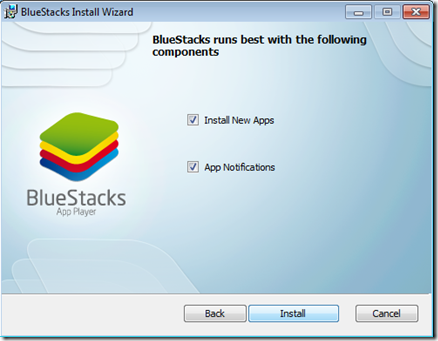 Choose Install.
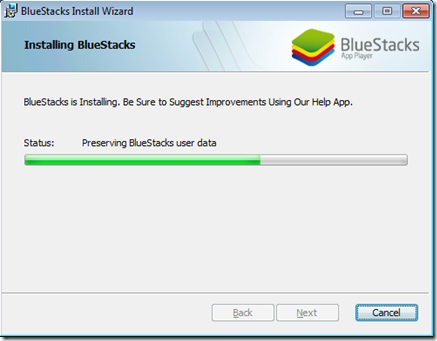 Wait for a while.
 Find the “Start BleuStacks” on the Windows button
 Wait again for the BlueStacks App Player to load.
 Your email and click Next.
  Ready to play an Android Apps.
STEP 2: Running your APK
If you do not any APK file, try download this –> http://bit.ly/m-mathuratkuis .
After the download finish just double click (alMathurat bersama Ustaz Don.apk). Your Windows supposedly recognise the APK file and associate it to the BlueStack App Player.


On the home panel of BlueStacks app player, you’ll see the icon of the app you just installed. Click it.

And, voila!!! Have fun…
Should you’d like to play your own Android apps, try locate the APK file in the bin folder of your Android project. Normally all the project folders are in the folder called workspace.

For more information about BlueStacks, you may refer to this good from my friend Gary Judge titled Instant Bluestacks from PacktPub.com. Find out how to win a copy of Instant BlueStacks.
Go to link Download