Thursday, March 30, 2017
Security Patches OS X 10 10 1 iOS 8 1 1 Apple TV 7 0 2
Security Patches OS X 10 10 1 iOS 8 1 1 Apple TV 7 0 2
Today Apple released software updates with the following security patches
OS X 10.10.1 Yosemite:
APPLE-SA-2014-11-17-2 OS X Yosemite 10.10.1OS X 10.10.1 is now available and addresses the following:CFNetworkAvailable for: OS X Yosemite v10.10Impact: Website cache may not be fully cleared after leaving private browsingDescription: A privacy issue existed where browsing data could remain in the cache after leaving private browsing. This issue was addressed through a change in caching behavior.CVE-IDCVE-2014-4460SpotlightAvailable for: OS X Yosemite v10.10Impact: Unnecessary information is included as part of the initial connection between Spotlight or Safari and the Spotlight Suggestions serversDescription: The initial connection made by Spotlight or Safari to the Spotlight Suggestions servers included a users approximate location before a user entered a query. This issue was addressed by removing this information from the initial connection and only sending the users approximate location as part of queries.CVE-IDCVE-2014-4453 : Ashkan SoltaniSystem Profiler About This MacAvailable for: OS X Yosemite v10.10Impact: Unnecessary information is included as part of a connection to Apple to determine the system modelDescription: The request made by About This Mac to determine the model of the system and direct users to the correct help resources included unnecessary cookies. This issue was addressed by removing cookies from the connection.CVE-IDCVE-2014-4458 : Landon Fuller of Plausible LabsWebKitAvailable for: OS X Yosemite v10.10Impact: Visiting a maliciously crafted website may lead to an unexpected application termination or arbitrary code execution Description: A use after free issue existed in the handling of page objects. This issue was addressed through improved memory management.CVE-IDCVE-2014-4459
iOS 8.1.1:
APPLE-SA-2014-11-17-1 iOS 8.1.1
iOS 8.1.1 is now available and addresses the following:CFNetwork
Available for: iPhone 4s and later,
iPod touch (5th generation) and later, iPad 2 and later Impact: Website cache may not be fully cleared after leaving private browsing
Description: A privacy issue existed where browsing data could remain in the cache after leaving private browsing. This issue was addressed through a change in caching behavior.
CVE-ID
CVE-2014-4460dyld
Available for: iPhone 4s and later,
iPod touch (5th generation) and later, iPad 2 and later Impact: A local user may be able to execute unsigned code Description: A state management issue existed in the handling of Mach-O executable files with overlapping segments. This issue was addressed through improved validation of segment sizes.
CVE-ID
CVE-2014-4455 : @PanguTeamKernel
Available for: iPhone 4s and later,
iPod touch (5th generation) and later, iPad 2 and later Impact: A malicious application may be able to execute arbitrary code with system privileges
Description: A validation issue existed in the handling of certain metadata fields of IOSharedDataQueue objects. This issue was addressed through relocation of the metadata.
CVE-ID
CVE-2014-4461 : @PanguTeam
Lock Screen
Available for: iPhone 4s and later,
iPod touch (5th generation) and later, iPad 2 and later Impact: An attacker in possession of a device may exceed the maximum number of failed passcode attempts
Description: In some circumstances, the failed passcode attempt limit was not enforced. This issue was addressed through additional enforcement of this limit.
CVE-ID
CVE-2014-4451 : Stuart Ryan of University of Technology, Sydney
Lock Screen
Available for: iPhone 4s and later,
iPod touch (5th generation) and later, iPad 2 and later Impact: A person with physical access to the phone may be able to access photos in the Photo Library
Description: The Leave a Message option in FaceTime may have allowed viewing and sending photos from the device. This issue was addressed through improved state management.
CVE-ID
CVE-2014-4463
Sandbox Profiles
Available for: iPhone 4s and later,
iPod touch (5th generation) and later, iPad 2 and later Impact: A malicious application may be able to launch arbitrary binaries on a trusted device
Description: A permissions issue existed with the debugging functionality for iOS that allowed the spawning of applications on trusted devices that were not being debugged. This was addressed by changes to debugservers sandbox.
CVE-ID
CVE-2014-4457 : @PanguTeam
Spotlight
Available for: iPhone 4s and later,
iPod touch (5th generation) and later, iPad 2 and later Impact: Unnecessary information is included as part of the initial connection between Spotlight or Safari and the Spotlight Suggestions servers
Description: The initial connection made by Spotlight or Safari to the Spotlight Suggestions servers included a users approximate location before a user entered a query. This issue was addressed by removing this information from the initial connection and only sending the users approximate location as part of queries. CVE-ID
CVE-2014-4453 : Ashkan Soltani
WebKit
Available for: iPhone 4s and later,
iPod touch (5th generation) and later, iPad 2 and later Impact: Visiting a maliciously crafted website may lead to an unexpected application termination or arbitrary code execution Description: Multiple memory corruption issues existed in WebKit. These issues were addressed through improved memory handling.
CVE-ID
CVE-2014-4452
CVE-2014-4462
APPLE-SA-2014-11-17-3 Apple TV 7.0.2
Apple TV 7.0.2 is now available and addresses the following:
Apple TV
Available for: Apple TV 3rd generation and later Impact: An attacker with a privileged network position may cause an unexpected application termination or arbitrary code execution Description: Multiple memory corruption issues existed in WebKit. These issues were addressed through improved memory handling.
CVE-ID
CVE-2014-4452
CVE-2014-4462
Apple TV
Available for: Apple TV 3rd generation and later Impact: A local user may be able to execute unsigned code Description: A state management issue existed in the handling of Mach-O executable files with overlapping segments. This issue was addressed through improved validation of segment sizes.
CVE-ID
CVE-2014-4455 : @PanguTeam
Apple TV
Available for: Apple TV 3rd generation and later Impact: A malicious application may be able to execute arbitrary code with system privileges
Description: A validation issue existed in the handling of certain metadata fields of IOSharedDataQueue objects. This issue was addressed through relocation of the metadata.
CVE-ID
CVE-2014-4461 : @PanguTeam
Security documents for all Apple security patches can be found (eventually) at:
https://support.apple.com/kb/HT1222
[Happy news! Apple has revamped the Apple Security Updates page. Hopefully, this means they will be taking it more seriously in the future. That would be a good thing.]

Go to link Download

Tuesday, March 7, 2017
Sale Gulung 10 rb per bungkus
Sale Gulung 10 rb per bungkus


?H??A??V??E?? ?A?? ?N??I??C??E?? ?W??E??E??K??E??N??D??
Invite Me ? bbm 28263ae3
?Kripik Tasik Asik juga menyediakan aneka Oleh-oleh khas tasikmalaya Lainnya

-CS selalu siap melayani TANPA mengenal hari libur-
Go to link Download
Sunday, January 8, 2017
Sandboxie 5 10 Crack
Sandboxie 5 10 Crack
Sandboxie
Sandboxie 5 10 Crack is a sandbox-based confinement program created by Invincea (which procured it from the first creator Ronen Tzur, for 32-and 64-bit Windows NT-based working frameworks. It makes a sandbox-like disengaged working environment in which applications can be run or introduced without forever changing the neighborhood or mapped drive.An segregated virtual environment permits controlled testing of untrusted projects and web surfing
Whats New:
Sand boxie doubles are presently double marked (SHA1 and SHA256) to dispose of IE 11 and Windows 10 declaration notices.
Altered Win 10 FR Build 14267 (SBIE1113 Cannot discover Nt framework administration, reason MASTER TABLE)
Altered Win 10 FR Build 14271 (SBIE1113 Cannot discover Nt framework administration, reason MASTER TABLE)
Instructions to Activate:
Unfasten and introduce,
Handicap your AntiVirus
After establishment finish close Sand boxie [from Taskbar too]
From "Break" organizer run "Sand boxie Patch.exe"
Take after the directions.
Theres nothing more to it. Appreciate
Download Link 1
Download Patch Only
Go to link Download
Monday, January 2, 2017
Running Windows inside your Ubuntu 7 10 installation
Running Windows inside your Ubuntu 7 10 installation
For people making jump from Windows to Linux the biggest problem is adjusting to new environment and applications , now even though these days really good open source alternatives to applications on Windows platform are available but still many people prefer using Windows applications .
Now ,If you want to run Windows application on your Ubuntu installation there are two options available
- You can use a virtualization software(like Qemu , Virualbox , VMware , bochs etc) which allows you to run full fledged installation of Microsoft Windows inside your Ubuntu desktop
- Or you might use a application layer called wine to run Windows application natively on Linux . While most of the people would prefer wine to run their windows application because it does not require one to have a licensed copy of windows , however application support in wine is
still patchy with some applications working flawlessly and some application not working at all . So well that leaves us to virtualization softwares .
Some of such popular applications available on Linux platform are : Innotek VirtualBox , Qemu , Vmware , Win4Lin and Bochs .
In This article we discuss how to install Microsoft Windows XP inside Ubuntu using QEmu and Virtualbox .
Qemu : - Qemu is a processor emulator created by Fabrice Bellard , it allows full virtualization of a system inside another thus paving way of allowing one operating system to run inside another operating system . Qemu is open source and released under GNU Lesser General Public License (GNU LGPL)
Qemu has many features not available in similar such products like VMware , bochs etc like increased x86 emulation with accelerator module (kqemu) .
This is what qemu website has to say about qemu : -
QEMU is a generic and open source machine emulator and virtualizer.
When used as a machine emulator, QEMU can run OSes and programs made for one machine (e.g. an ARM board) on a different machine (e.g. your own PC). By using dynamic translation, it achieves very good performances.
When used as a virtualizer, QEMU achieves near native performances by executing the guest code directly on the host CPU. A host driver called the QEMU accelerator (also known as KQEMU) is needed in this case. The virtualizer mode requires that both the host and guest machine use x86 compatible processors.
We would be primarily showing you how to install Windows XP under qemu with accelerator module enabled .
VirtualBox : - InnoTek VirtualBox is a commercial PC Virtualization software similar to Qemu and Vmware and allows running of one operating system inside another . InnoTek VirtualBox though is a commercial software , however there is a limited free version of VirtualBox available too which we will discuss briefly in this article .
Installing Qemu : -
Before we start installing qemu we need to enable all of the Ubuntu repositories which could be done by following these steps : -
Enabling Additional Repositories
Now many applications need additional repositories to be installed or some to be enabled in Synaptic package manager so before trying out steps given below ensure that repositories in order.
Launch Synaptic Package Manager (System -> Administration -> Synaptic Package Manager ) , then in Synaptic package manager go to (Settings -> Repositories ) you will find window like this . Ensure that all the check boxes are marked leaving source code(if you want to you can enable this also but you are not going to need this unless you are software developer) the dialog box should look like this .
 Dialog Box showing the repositories that should be enabled
Now , To install qemu type in the following command in the terminal window :
sudo apt-get install qemu
sudo apt-get install kqemu-source
sudo apt-get install module-assistant
sudo module-assistant auto-install kqemu
After completing above step the kqemu( accelerator module of qemu which allows you to run virtual operating system at near native speed should be compiled properly and ready to be used)
Now type in the following commands to configure kqemu
First we need to create /etc/udev/rules.d/60-kqemu.rules file and open it for editing , we can do it by issuing the following command in the terminal window :
gksu gedit /etc/udev/rules.d/60-kqemu.rulesAfter the file is opened in the gedit text editor add the following line in the file and make sure you add a newline at end of file too .
KERNEL=="kqemu", NAME="%k", GROUP="kqemu", MODE="0660"
now open the file /etc/modprobe.d/kqemu and modify the content of file to look like :
options kqemu major=0Now after above step is completed we need to create a group "kqemu" and add all those users who would like to use kqemu to this group , we can do this by following the commands listed below :
To create group : -
sudo addgroup --system kqemu
Now once the group "kqemu" is created we need to add the users who would be using kqemu to this group we can do this by issuing the following command in the terminal window , remember to change $USER with the users login name for example in my case it is "ambuj" (so command issued was sudo adduser ambuj kqemu ).
sudo adduser $USER kqemu
Now logout of the session and loggin again so that these changes are reflected properly .
After these steps are completed issue the following commands in this sequence to load kqemu module
Force udev to reload by :
sudo /etc/init.d/udev reload
and now finally to load kqemu module
sudo update-modulesInstead if you want kqemu module to load automatically insert "kqemu" in the file /etc/modules
sudo modprobe kqemu
gksu gedit /etc/modules
If you have followed steps properly you should have qemu with kqemu module working properly and now you could move forward and install Windows XP .
Installing Windows XP inside qemu
To install Windows or any other operating system we first need to create a virtual drive which is basically a file residing in your linux partition which would be used as a hard disk for your Guest operating system .
To create virtual drive for windows type in the following command in the terminal window (in the directory you want to create virtual drive and install windows)
qemu-img create win.img 4GThis would create a virtual drive by the name of win.img which is 4GB large . You might like to tinker with the size of the virtual drive or its partition drive .


Now , put in the Windows CD in the drive and follow step no 1
If you have an iso from which you like to boot follow step no 2
Step no 1 :
qemu -localtime -cdrom /dev/cdrom -m 356 -boot d win.img
This command creates a virtual computer which boots from your local cd rom and has 356 MB of memory allocated as its RAM .
Step no 2 (Follow this step instead of step 1 if you have an iso of Windows installation which you would like to boot )
If you have an iso of windows which you would like to use as CD Rom for your virtual computer type in the following command(replace cdwin.iso with the name of the iso you want to boot from)
qemu -localtime -cdrom cdwin.iso -m 356 -boot d win.img


First ensure that all the repositories are in order as mentioned in the step above . After ensuring that repositories are in order issue the following command to install VirtualBox : -
sudo apt-get install virtualboxand after above step is completed launch VirtualBox from (Applications -> System Tools -> InnoTek VirtualBox )
Now entire interface of VirtualBox is very user friendly and wizard based so well there should not be any problem in installing guest operating system inside VirtualBox hence i am not listing procedure here .


For Linux on Desktop blog , http://linuxondesktop.blogspot.com
(C) 2007, Ambuj Varshney
Go to link Download
Thursday, December 8, 2016
Reset Epson ME 10 Waste Ink Counter overflow problem Update Epson Resetter
Reset Epson ME 10 Waste Ink Counter overflow problem Update Epson Resetter
Reset Epson ME-10 Waste Ink Counter overflow problem - Update
New Post has been published on http://resetkey.net/reset-epson-me-10-waste-ink-counter-overflow-problem.html
Welcome to Resetkey.netReset Epson ME-10 Waste Ink Counter overflow problem
If Epson ME-10 printer shows problem message “The Printer’s Ink Pads at the end of Their service life” and Epson ME-10 printer has red light blinking problem: You need to download and reset your Epson ME-10 printer Waste Ink Counter with Epson ME-10 Resetter (how to…

You can download wic reset utility and get resetkey at Resetkey.net
Post via Tumblr http://wicreset.tumblr.com/post/147293863849Welcome to epsonresetkey.blogspot.com
Go to link Download
Thursday, November 10, 2016
Samsung Mobile Flashing Software Flashing Tool Without Box v3 10 6 Free Download
Samsung Mobile Flashing Software Flashing Tool Without Box v3 10 6 Free Download

Download | Mirror
Go to link Download
Monday, October 31, 2016
Samsung Galaxy Tab 2 7 0 and Galaxy Tab 2 10 1 launch details
Samsung Galaxy Tab 2 7 0 and Galaxy Tab 2 10 1 launch details
Here are the details of Samsung Galaxy Tab 2 7.0 and Galaxy Tab 2 10.1 launch. The first samsung tablet that will run android 4.0 ice cream sandwich will be samsung Galaxy Tab 2 7.0, announced by the company. They also have a plan for a litle bit larger display, 10.1 inch galaxy tab tablet version. unfortunately, we still dont have a clear picture of these upcoming samsung galaxy tab. an international launch looked like will be at the late last month, even that issue is still fizzled.
and today samsung was make a good news for us, the android fans. they said that samsung Galaxy Tab 2 7.0 will be the first to release. pre-orders will held on april 12 this year and will available on the market on April 22.
For the Tab 2 10.1 you have to wait a bit longer, but will be available soon.its available for pre-order on May 4, with actual tablet details will announced on May 13.
Samsung Galaxy Tab 2 7.0 prices at $250, it might could steal some customer of the Kindle Fire. while the Samsung Galaxy Tab 2 10.1 will prices at $400.
cant wait too see it soon.

Go to link Download
Monday, October 3, 2016
Samsung Galaxy Tab 10 1 Firmware Update Official
Samsung Galaxy Tab 10 1 Firmware Update Official
To know whether the update is available or not, please go to Settings –> About Phone –> Update
Through this installation process, I’m using DDMS to capture the screenshots. Anyway, not all of the time the tablet connected to DDMS, so I also need a camera (am using my Samsung Galaxy S to capture screenshots).
Downloading upgrade files.

Finish download, and install upgrade.
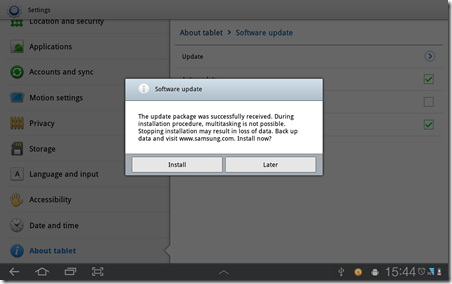

After this, the system will reboot itself.
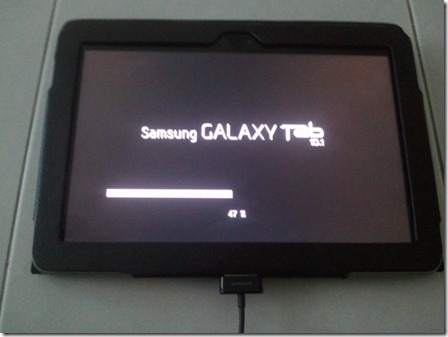
Installing… Beyond this point, your tablet will not be connected to DDMS.
This process took quite sometime to finish (20 minutes.

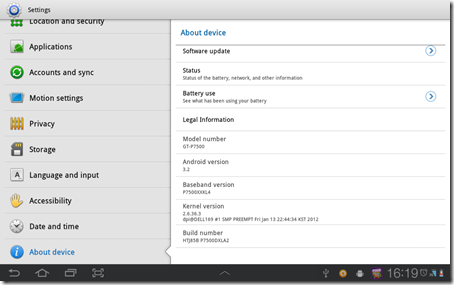
Noticeable changes

Go to link Download
Wednesday, September 28, 2016
SA jumps 10 places on global ICT index TechCentral
SA jumps 10 places on global ICT index TechCentral

Go to link Download
Rufus 2 10 Terbaru
Rufus 2 10 Terbaru
 Rufus adalah aplikasi kecil yang handal, utilitas portabel yang dirancang untuk memformat dan membuat bootable USB flash / Pendrive dan Memori stick. Hal ini dapat digunakan untuk membuat media instalasi USB dari bootable ISO images untuk Windows, Linux, UEFI, dll, Rufus utilitas tingkat rendah untuk boot PC tanpa sistem operasi. Untuk menggunakan program ini sangat mudah, cukup pilih drive USB yang ingin Anda format dan memilih skema partisi dan file system. Ada opsi tambahan untuk memeriksa dan membuat label dan file ikon, serta beberapa opsi lanjutan untuk kompatibilitas Bios yang bisa Anda sesuaikan.
Download :
Rufus - Portabel (915.11 KB)
Author : Rufus
Semoga Berguna. See Yaa !!!
Go to link Download