 |
| Printer Canon All in One |
Showing posts with label one. Show all posts
Showing posts with label one. Show all posts
Tuesday, May 2, 2017
Review Printer HP DeskJet Ink Advantage 3635 All in One dan Harga di Bulan Juni 2106
Review Printer HP DeskJet Ink Advantage 3635 All in One dan Harga di Bulan Juni 2106
Pada postingan kali ini saya akan membahas tentang produk terbaru dari printer HP dengan seri Deskjet Ink Advantage 3635. Printer ini adalah printer jenis All-in-One karena mempunyai fungsi yang beragam yaitu bisa Printer, Scan and Copy. Printer HP deskjet 3635 ini menggunakan tipe tinta HP-680 black dan 680-Tri colour. Dengan tipe katrid tersebut anda akan bisa mencetak lebih banyak dan dengan harga katrid yang lumayan terjangkau dibandingkan dengan pesaingnya Canon. Kemudian Untuk printer jenis ini juga sudah didesign compact lho, jadi anda tidak usah khawatir dengan masalah penempatan printer diruang kerja kita. Kemudian untuk konektivitas Printer ini yaitu bisa menggunakan USB 2.0 dan bisa juga dengan nirkabel atau via Wi-Fi.

Disini saya akan memberikan gambaran/tentang kelebihan-kelebihan yang ditawarkan oleh Printer HP Deskjet Ink Advantage 3635, dan berikut dibawah ini adalah fitur detailnya yang ditawarkan buat anda.
PRINTER HEMAT BIAYA
Kenapa bisa dibilang hemat beaya, karena dengan dukungan katrid HP 680 Blacck dan 680-Tri colour anda dapat melakukan pencetakan 480 halaman/lembar untuk mono (hitam putih) dan 150 halaman/lembar untuk colour atau warna. Selain itu printer ini juga bisa anda beli dengan harga yang sangat terjangkau mengingat fungsinya yang sudah lumayan bagus dikelasnya.
PRINTER MOBILE
Kenapa kog dikatakan printer mobile, karena konektivitas pencetakan dengan Wi-Fi menggunakan printer HP Deskjet 3635 ini kita bisa melakukan pencetakan file, foto atau gambar langsung dari smartphone, Tablet dan Pc. Printer ini juga dapat langsung memindai dari printer ke Smartphone kita sehingga kita lebih mudah dalam hal berbagi, pokoknya printer ini sudah tergolong printer cerdas.
KEMAMPUAN MULTIFUNGSI
Printer HP Deskjet 3635 ini sudah mempunyai fungsi yang All-in-One atau bisa dikatakan multi fungsi, karena kegunaanya yang sudah bisa untuk printer, men-Scan dan sekaligus bisa untuk foto copy. dengan kemampuan yang ditawarkan tentunya anda akan lebih dimudahkan dalam hal pekerjaan, waktu dan beaya. Kita tidak usah repot-repot lagi keluar hanya sekedar foto copy satu atau dua lembar.
DESIGN COMPACT
Printer HP Deskjet 3635 ini telah di design dari pabrik pembuatnya dengan design COMPACT, artinya design yang simple, praktis dan tidak terlalu memakan banya ruang dalam penempatanya. Jika meja kerja anda minimalis maka printer ini mungkin cocok untuk anda.
MENCETAK FOTO TANPA BATAS
Printer HP Deskjet 3635 ini mempunyai kemampuan cetak foto Borderless, artinya kita dapat melakukan pencetakan foto secara penuh dan tanpa batas, dengan kualitas layaknya di Lab, serta dapat mencetak dokument setajam Laser. Gimana keren banget kan?
HARGA PRINTER DI PASARAN
Untuk Harga printer ini saya telah melakukan di beberapa tolo online di wilayah tempat saya tinggal yaitu sekitaran solo jogja, printer ini dibanderol dengan harga kisaran Rp. 1.150.000,- dan harga ini mungkin bisa berubah-ubah mengikuti kurs dollar dan kebijakan masing-masing toko penjual unitnya. Disini saya hanya melakukan review jadi saya tidak menjual unit dari printer diatas. Jika anda berminat silahkan kunjungi toko-toko online yang menjual unit tersebut.
Demikianlah ulasan tentang printer HP Deskjet 3635 versi dokter printer di bulan juni 2016 ini, dengan informasi yang saya berikan ini, semoga bisa menjadi pertimbangan buat anda yang sekarang sedang melakukan perburuan printer. Sekelumit semoga bisa bermanfaat, sekian dan terima kasih :)
Go to link Download

Sunday, April 23, 2017
Reverse Engineering for Noobs Step by Step guide to crack A One Video to Audio convertor
Reverse Engineering for Noobs Step by Step guide to crack A One Video to Audio convertor
Its been some time since I have written a reverse engineering tutorial, & I thought it would be good to cover one at the
Disclaimer – By Reading this tutorial You agree that this tutorial is intended for educational purposes only and the author can not be held liable for any kind of damages done whatsoever to your machine, or damages caused by some other,creative application of this tutorial.
In any case you disagree with the above statement,stop here.
Requirements
- A-one Video to Audio convertor (Download from yaomingsoft.com)
- OllyDBG
- Time & Patience
Download & install A-one Video to Audio convertor. Now as you can see, its a trial version & once you try to register it, it gives an error <obviously>, & we need to find ways against it.
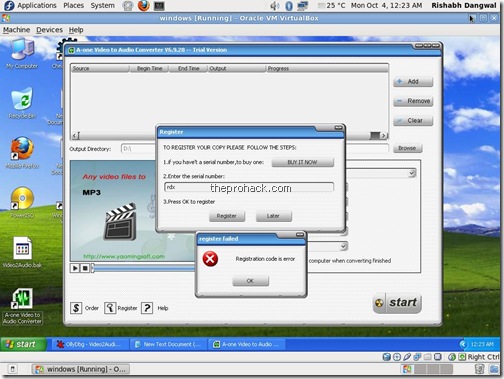
Now, to being with, fire up OllyDBG & load the A-one Video to Audio convertor EXE file in it.

Now, right click on
CPU window -> Search for -> All Referenced Text Strings

& in Text string window, right click -> paste the "Registration code is error" string (which pops when you input wrong serial) After you find it, double click it & navigate to the memory address.

Now, once you have reached the intended memory address, you can navigate a bit up to see the "register successful" string.

Navigating a bit above will get a simple logic which calls a specific function, & then the function returns a result which is compared to EAX
CMP EAX,1
& then jumps to 407A0F
JNZ SHORT 00407A0F
which is the "register failed" condition.
The whole scenario means that if value of EAX is anything less than or grater than one, the program will be a trial version & will not accept any invalid serial key.
Now, you can put a break point above the function call by pressing F2 & run the program, & enter the serial, the program will break & we can then navigate inside the function by pressing F7
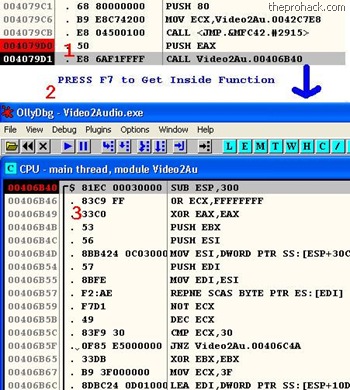
You will get into function code. Add the breakpoint there by pressing F2 & restart the program again by pressing Ctrl + F9
Run it again & you will find that it will break it at 00406B40 (where you put the last breakpoint)
now, we will execute code step by step by pressing F8, once we go a bit down, we find
JNZ Video2Au.00406C4A
which jumps below to
POP EDI

& further we find that the value of EAX is XORed to 0.

so in order to insert a precise value into EAX, we will modify by double clicking
XOR EAX,EAX
& changing it to
MOV AL,1

which will set the accumulators value to 1 because
EAX - 32 Bit reg <extended>
AX - 16 Bit reg pair
AH / AL - 8 Bit regs
where AL will represent the lower value, & setting it to one will set the accumulator to a precise value of 1, hence setting value of EAX to 1,which will lead to program being registered :)
now once you have done it, right click the code,
copy to executable-> selection.
In the coming window, right click again, save the file & you have a cracked working version of the software, paste it in program files directory & insert any serial.
it will work :D
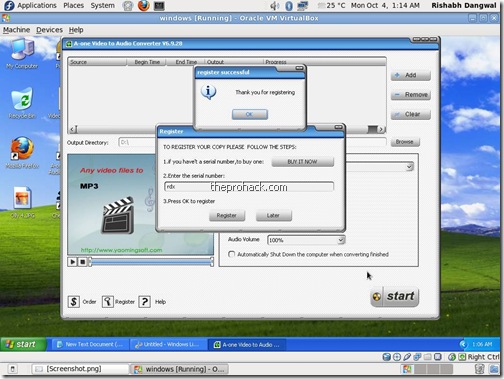
I hope you liked it :)
like this post ? you can buy me a beer :)
Posted by XERO. ALL RIGHTS RESERVED.Source
Go to link Download
Saturday, April 8, 2017
Review HP DeskJet Ink Advantage Ultra 4729 All in One Printer dan Harga di Bulan Juni 2016
Review HP DeskJet Ink Advantage Ultra 4729 All in One Printer dan Harga di Bulan Juni 2016
Hai, ketemu lagi dengan saya di dokter printer, sebelumnya saya telah membagikan review dari printer HP Deskjet 2135 dan HP Deskjet 3635 dan untuk kali ini saya akan membagikan lagi kepada sahabat semua review Tentang printer HP Deskjet Ink Advantage Ultra 4729. Printer ini juga satu keluarga dengan dua printer yang telah saya posting sebelumnya, yaitu dalam keluarga Advantage.
Printer HP Deskjet Ink Advantage Ultra 4729 ini adalah printer keluaran terbaru dari vendor HP yang memiliki kemampuan multi fungsi atau All-in-One, Akan tetapi printer ini menghadirkan kemampuan yang lebih berkelas dari seri yang sebelumnya. Perbedaan yang mencolok dari printer ini dengan yang sebelumnya saya tulis yaitu HP2135 dan HP3635 dengan HP 4729 ini adalah pada seri tinta yang digunakan dan kuantitas dari pencetakan. Printer ini menggunakan Tinta dengan seri HP 46 Black dan HP 46-Tri Colour. Dengan menggunakan kedua tinta tersebut printer ini memiliki kemampuan mencetak sampai 1500 halaman/lembar untuk mono (hitam putih) dan dan 750 halaman untuk Colour/warna. Gimana gila bukan? 1500 sama 750 halaman?? Kemampuan yang sangat luar biasa.

Berikut ini adalah Fitur lengkap dari Printer HP Deskjet InkAdvantage 4729 yang saya dapatkan dari website resminya HP.com
Jenis printer : Inkjet All-in-one atau multifungsi
Kecepatan cetak : 7.5 ppm Black dan 5.5 ppm Colour
Tinta : HP 46 Black dan HP 46-Tri Colour
Resolusi : 4800 Dpi
Konektivitas : Wi-fi dan Usb 2.0 Hi-Speed
HARGA PRINTER
Untuk harga printer ini setelah saya melakukan survai dari beberapa toko online di banderol dengan harga kisaran Rp. 1.899.000,-. Harga ini mungkin berubah ubah sesuai dengan kurs dollar dan sesuai dari kebijakan toko si penjual. Di blog ini tidak menjual unit tersebut dan sekedar memberikan informasi tentang unit printer kepada pembaca sekalian dengan tujuan, dengan informasi yang saya berikan ini bisa menjadi pertimbangan maupun pembanding ketika anda sedang melakukan perburuan printer.
Demikian sedikit uraian tentang printer HP Deskjet Ink Advantage 4729, semoga bisa memberikan manfaat bagi anda. Sekian dari saya dan kami ucapakan banyak terima kasih atas kunjugannya dan jangan lupa untuk kembali lagi karena di blog ini akan selalu ada info-info terbaru buat anda :)
Go to link Download
Friday, February 24, 2017
Resetter Printer Canon All in One Download
Resetter Printer Canon All in One Download
Resetter Printer Canon All in One Download
When we need to print something, the printer is error, then we have to find solution to solve it. you need to reset your printer. For you who need to reset your Canon All in one, here is the best place for you to download the resetter.
When we need to print something, the printer is error, then we have to find solution to solve it. you need to reset your printer. For you who need to reset your Canon All in one, here is the best place for you to download the resetter.
This is how to reset Canon All in One
- Turn On your printer until you see Error Eo8 comes up, and you also see "The Ink Absorber is Almost Full" on your monitor.
- Prepare Resetter Canon (can be downloaded by clicking the download link below)
- Make your printer in Service Mode. This is how to do it:
- Turn of the Error Printer by pushing POWER button, do not unplug the Power Cable
- Press and hold the STOP/RESET button together with POWER button
- Release STOP/RESET button but do not release POWER button
- While you are still pressing the POWER Button, Press STOP/RESET 6 times
- then release both of button (STOP/RESET and POWER Buttons) at the same time, then your printer will be in the Service Mode
- The computer will detect a new device/hardware, ignore it
- Then extract and run the Software
- In the menu absorber clear ink counter Choose Main then click SET in the right side.
- In the menu ink absorber counter choose Main then click SET in the right side.
- Then click EEOPROM. then a printer will print a page.
- Youre done. the printer will works well.
Resetter Printer Canon All in One Download link
- Turn On your printer until you see Error Eo8 comes up, and you also see "The Ink Absorber is Almost Full" on your monitor.
- Prepare Resetter Canon (can be downloaded by clicking the download link below)
- Make your printer in Service Mode. This is how to do it:
- Turn of the Error Printer by pushing POWER button, do not unplug the Power Cable
- Press and hold the STOP/RESET button together with POWER button
- Release STOP/RESET button but do not release POWER button
- While you are still pressing the POWER Button, Press STOP/RESET 6 times
- then release both of button (STOP/RESET and POWER Buttons) at the same time, then your printer will be in the Service Mode
- The computer will detect a new device/hardware, ignore it
- Then extract and run the Software
- In the menu absorber clear ink counter Choose Main then click SET in the right side.
- In the menu ink absorber counter choose Main then click SET in the right side.
- Then click EEOPROM. then a printer will print a page.
- Youre done. the printer will works well.
Resetter Printer Canon All in One Download link
Printer Canon Type | Download |
Canon ip1980 | Download |
Canon ip1880 | Download |
Canon IP2770 | Download |
Canon Pixma Mp258 | Download |
Canon Pixma iP1000 | Download |
Canon iP1200 | Download |
Canon iP1300, | Download |
Canon iP1600, iP1700, iP1800, iP2200, iP2500 | Download |
Canon MP150, MP160 | Download |
Canon MP170, MP180, MP450, MP460 | Download |
Canon Pixma iP1300, | Download |
Canon Pixma iP1800 | Download |
Canon Pixma iP1700 | Download |
Go to link Download
Subscribe to:
Posts (Atom)