Monday, May 29, 2017
Remove Unused Driver In Windows XP
Remove Unused Driver In Windows XP

???????????????? ???? device ?? driver ??????? ??????????? ?????????????????????????? ????????? ??? ????????????? ??????????????? ?????? ???????????????? ????????????????????? ???? ??????????? ?????????????
??????????? ??????????????? device driver ??????? ???????????????? ??????????????????????? ??????? ?????????????????????????? ?????????-
(1) System Properties dialog box ??? ????????????????? Keyboard ?? [Windows] ????? [Break] Key ??????? ???????????????? ????????????? desktop ?????? My Computer icon ??????? Right Click - Properties ?????????? ???????????????
(2) ??????? Advanced Tab ??? click ?????????????? Environment Variables ??? ????????????????
(3) System Variable panel ??? ??????????? New button ??????? click ????????
(4) New System Variables dialog box ??????????? Variable Name ????????? devmgr_show_nonpresent_devices ?? ?????????????? Variable Value ??????????? 1 ?? ???????????????????????????
(5) ????????? System Properties dialog box ???? ???????????????? OK ??? click ???????? ????????? OK ??? click ?????????????
(6) Hardware Tab ??? ??????????????? Device Manager button ??? click ???????? Device Manager ??? View menu ??????? Show hidden device ??? click ????????????????
(7) Device Tree ???????? device ???????????????? ???????? ?????????????????? + sing icon ??????? click ?????????????? ???????????????? device driver icon ??????? ????????????
(8) ??????? ????????????? device driver ??????? ??????????????? icon ??????? Right Click ????????? Uninstall ??? ??????????? ????????????? ??????????????????? ???????? ????????????????? device driver ??????? ?????????????????????????????????????????? ???????????????????? ???????? ?????? ??????? ???????????????????????????????????? ????????????? ???????????? ??????????
Go to link Download

Sunday, May 28, 2017
Remove Malware With RegRun Reanimator
Remove Malware With RegRun Reanimator
Malware like Trojans/Adware/Rootkits are software designed to infiltrate a computer system without the owners informed consent , which damage your pc and your security.RegRun Reanimator is a handy tool designed to help you remove such malicious programs from your computer.
After scanning Reanimator will show you a list of the suspicious files it found ,you will be allowed to decide if they are actually a threat or not by clicking on them.Greatis Support team will support you if you send a log report to them for analysis.They will provide you a .rnr file which you can use to continue with the malware removal.

Reanimator makes a boot scan at the reboot of the system to detect easier hidden rootkits, has a registry guard tool to protect registry, makes system restore points, has a restore manager with registry rescue, safe deleting features, is able to unlock banned task manager and Regedit after a virus attack and makes/restores backups.The scanning process is fast, the software generates reports after virus scanning, the software is also able to protect the computer against USB flash viruses.
Download |Windows 95/98/Me/NT4/2000/XP/2003/VISTA/7 | Tutorial |8.2MB |Freeware
Go to link Download
Wednesday, May 24, 2017
Remove your MSN passport login details
Remove your MSN passport login details
 To remove the signin details of MSN you will need to modify/create a key within the system registry. Open the Registry Editor, and navigate to the key:
Create a Value called "disabledomaincreds" and set it to "1".
Reboot will finalise the process.
Note: This is generally only usefull if you are setting up a system to be used by many users.
Key Details:
Machine Key:
Value Name: disabledomaincreds
Data Type: REG_DWORD (DWORD Value)
Data Value: "1" = disable : "0" = enable
Heres a faster, safe, alternate way: must be logged in as ADMIN
Goto Start + Control Panel + User Accounts + Choose your account + "Manage my network passwords" at the top left + Then delete whichever msn accounts you dont need
Go to link Download
Monday, May 1, 2017
Remove red eye in photos PhotoShop Tutorials
Remove red eye in photos PhotoShop Tutorials
 |
| Remove red eye in photos , PhotoShop Tutorials |
Hi my visitors
Welcome to my new video tutorial for Photoshop , for the new tuto i will show you how to remove red eye from you photo , i know most people have this problem so the solution is with adrobe Photoshop .
But before i will show you the steps
www.twitter.com/laremdesigner
Go to link Download
Wednesday, February 22, 2017
Remove Windows Genuine Advantage WGA
Remove Windows Genuine Advantage WGA
 Windows yang kita miliki sering kali terdeteksi oleh Microsoft Windows yang kemudian Windows yang kita miliki dinyatakan ilegal dan kemudian muncullah logo Windows Genuine Advantage. Hal ini merugikan kita sebagai pengguna Windows tersebut. Saya pun merasa tergangu dengan tampilan yang hitam di layar dan tidak dapat mengganti themes display. Awalnya saya bingung dan berpikir untuk menginstal ulang windows 7 yang ada, namun hal itu batal dilakukan mengingat kesibukan yang saya hadapi. Komputer saya ini digunakan hampir tiap hari untuk membuat persiapan dan administrasi pekerjaan. Jika saya menginstal ulang akan mengakibatkan menumpuknya pekerjaan itu. Oleh sebab itu saya berusaha mencari cara untuk menghilangkan logo Windows Genuine Advantage itu. Awal mulanya ada seorang teman yang memberi tahu gunakan saja RemoveWAT. Saya akhirnya mendownload RemoveWAT dan mengacessnya. Program ini benar bisa menghilangkan logo Windows Genuine Advantage, namun setelah beberapa saat kembali display layar menjadi hitam. Dan setiap kali masuk windows akan muncul pertanyaan activation windows. Hal ini menjadi kebingungan saya yang baru. Saya bertanya pada teman namun tidak ada yang dapat memberi solusi pas untuk hal ini. Akhirnya ketika saya mencoba untuk mencari product key Windows 7, saya temukan cara untuk menginstal product key itu dengan nama Windows Loader. Saya mendownload program ini dan mengacessnya, program ini di akhiri dengan meminta untuk restart. Ketika kembali ke Windows dan saya lihat di system ternyata tertulis Windows is activated. Namun di sampingnya ada logo Windows Genuine Advantage. Nah untuk menghilangkan logo itu kembali gunakan RemoveWAT. Hasilnya Windows saya kembali dapat memasang themes display. Bagi teman-teman yang mengalami hal serupa dapat di coba cara ini. Karena saya sendiri sudah mencobanya dan ternyata berhasil. Ok mungkin itu saja share dari saya semoga bermanfaat.

Go to link Download
Monday, February 20, 2017
Remove WGA v1 2 Freeware
Remove WGA v1 2 Freeware
 Software Ini sama sperti Windows Loader dan AntiWPA yang saya share kemaren. Kemaren saya menshare Windows 7 Loader yang khususnya untuk windows 7. Jadi sekarang saya akan menshare khusus untuk windows xp. Windows xp yang belum genuine memiliki yang namanya WGA (Window Genuine Advantage). Maka saya akan memberikan Remove WGA. Dari namanya mungin sudah tau fungsi yang satu ini, Remove WGA merupakan utilities tool kecil yang befungsi untuk menghilangkan Window Genuine Advantage (WGA).
Screenshot : Windows XP Not Genuine
Note!!!
Beberapa program antivirus dan antispyware RemoveWGA bendera sebagai terinfeksi / malware, meskipun aplikasi adalah hal yang aman dan tidak mengajukan ancaman ke sistem anda. Jika terdekteksi, disable antivirus dulu.
Adapun cara menghilangkan pesan WGA yang muncul ditray Icon:
Langkah2nya adalah sebagai berikut :
1.Buka Task Manager dengan Ctrl+Alt+Del
2.Matikan proses yang bernama “wgatray.exe”
3.Restart/reboot komputer dan masuklah ke dalam safe mode
4.Pada safe mode, buka registry editor ato regedit melalui menu Run. Ketik regedit kemudian enter
5.Pada regedit, carilah HKEY_LOCAL_MACHINESOFTWAREmicrosoftwindowsNTCurrentVersionWinlogonNotify, kemudian hapus folder/directory “WGALOGON”
6.Restart kembali komputer seperti biasa…
Download Remove WGA v1.2 Freeware :
via ziddu - 204Kb
Selamat Mencoba !!!
Go to link Download
Wednesday, December 28, 2016
Samsung c3303 Remove lock code without flashing
Samsung c3303 Remove lock code without flashing

click direct unlock and follow instructons
here is log
Selected com port: COM4
Selected speed port: 921600
Press "volume up" + "lock" and connect USB cable to phone
Connect to control pipe... OK
Processor ID -> 0A33
Sending loader... OK
Connect to control pipe... OK
Connect to write pipe... OK
Connect to read pipe... OK
Damping... OK
Erasing... OK
Sending... OK
Unlock - ok
If lock - not deactivate: Please make full reset *2767*3855# + input code #7465625*638*00000000#
Elapsed time: 133 second, sw ver: 3.5.0027
Go to link Download
Friday, December 2, 2016
Remove WAT Freeware
Remove WAT Freeware
 Windows seven 7 merupakan windows yang sangat populer saat ini, tetapi banyak yang belum asli alias bajakan , kemaren saya share window 7 Loader by daz yang fungsinya sama dengan yg saya share ini .. Jadi untuk menghilangkannya cukup mudah dengan bantuan RemoveWAT . Remove WAT (Windows Aktivasi Technologies) Merupakan - sebuah software untuk menghilangkan trial 30 hari /menghilangkan WAT pada windows 7 . Software ini sangat simple dan mudah digunakan.
Screenshot : About Window 7 Not Genuine 
 Cara Penggunaan Remove WAT :
- Jalankan/klik Remove WAT 2.2.5.2
- Setelah tampil, klik Remove WAT
- Tunggu beberapa saat jangan jalankan aplikasi apapun hingga muncul tampilan untuk merestart
- Klik restart
- Sesudah di restart, klik kanan my computer => Properties, lihat apakah masih ada status trialnya atau tidak
- Semoga Berhasil
Setelah proses selesai ,maka window 7 anda akan Genuine / Asli sperti gambar dibawah ini:
Screenshot : About Windows 7 Genuine / Asli 
Note!!
Sebaiknya matikan terlebih dahulu AntiVirus Anda sebelum mengekstrak file, mungkin beberapa AntiVirus akan menganggap RemoveWAT ini sebagai Virus, namun ini bukanlah sebuah Virus.
Download Remove WAT - Freeware
via ziddu - 440 KB
Selamat mencoba !
Good Luck ^^
Go to link Download
Sunday, October 30, 2016
Remove Common and Stubborn Infections with CaSIR
Remove Common and Stubborn Infections with CaSIR
Malicious programs like viruses, worms, Trojans, etc are very difficult to detect and remove by regular anti-virus programs. In addition to that these programs often have the capability to disable your computer or your anti-virus programs. Once you are infected, it is difficult to rescue your Computer. But now there is a solution and it is called CaSIR.

It recognizes and instantly kills and deletes any running process that is disguising itself among the legitimate system services. This tiny tool clean up PC registry so that there will no longer be any spy keys, garbage activities or messages that are asking for already erased files.

Features
· Removes the common restrictions made to your computer by infectors.
· Removes the illegitimate services frequently used by those infectors.
· Recognizes and instantly kills and deletes any running process that is disguising itself among the legitimate system services.
· Removes malicious auto start entries.
· Removes any auto starting registry entries related to the illegitimate services he detects.
· It deals with all your storage medias including hard drives, floppy drives, removable drives and memory cards and cleans them up all if need be.
· It cleans up your system registry so no more spy keys, garbage activities or messages keep asking for already deleted files.
· Once you download the software, you can update new definitions frequently .
You can also keep a track about all the scans and malicious files through CaSIR’s event log file(casirrpt.txt) which is updated regularly by the tool itself.

CaSIR compatible with Windows XP, Windows Vista and Windows 7. Download CaSIR
Go to link Download
Monday, October 17, 2016
Remove REGSVR EXE and New Folder exe viruses completely
Remove REGSVR EXE and New Folder exe viruses completely
Plug a pendrive into a public computer and you will be pesked by the continuously replicating “New Folder.exe” virus or 
Time for some virus busting I guess..here is how you can remove “regsvr.exe” and “new folder.exe” from your computer.
Step 1 - Some Startup Repairs
First of all, boot into safe mode.After you get to your desktop,press F3 or Ctrl + F and search for “autorun.inf” file in your computer and delete all the subsequent files. I case you are no able to delete them, select all the files and uncheck the”Read Only” option. If you are still not able to delete them , you might want to try out Unlocker tool to delete the files.
Now go to
start – > run –> type ”msconfig”
and press enter
Go to startup tab and uncheck “regsvr”, click ok and then click on “Exit without restart”.
Now go to
control panel –> scheduled tasks and delete “At1” task listed there.
Once done, close all windows.
Step 2 - Changing Configurations
Your registry might be disabled,and you need to activate it back to undo all the malicious changes done by worm.In order to do that, you need to go to
start – > run –> type ”gpedit.msc”
and press enter
then navigate to
users configuration –> Administrative templates –> systems
Find “prevent access to registry editing tools” , double click it and change the option to disable.
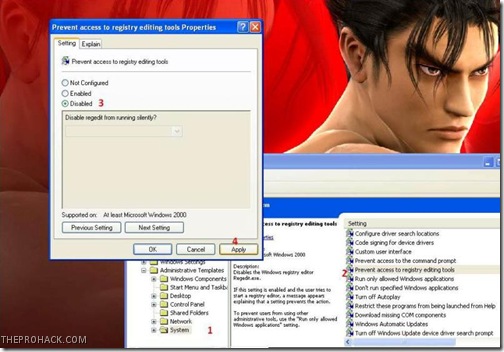
Once done, your Regedit will be enabled. In case your task manager is disabled, you need to enable it.
Step 3 - Registry Edits
Now we have to perform some registry edits to enable our explorer and to remove all instances of worm from the registry. Go to
start – > run –> type ”regedit”
and press enter
Click on Edit –> Find and search for regsvr.exe . Find and delete all the occurrences of regsvr.exe virus (dont delete regsvr32.exe as its not a virus).
then navigate to entry
HKEY_LOCAL_MACHINESOFTWAREMicrosoftWindows NTCurrentVersionWinlogon
and modify the entry
Shell = “Explorer.exe regsvr.exe”
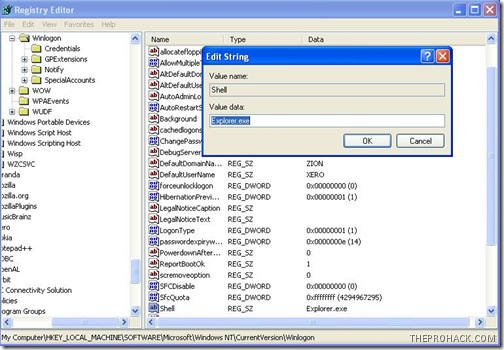
to delete the regsvr.exe from it,so that it becomes
Shell = “Explorer.exe”
Once done, close all windows and get ready to delete all virus files.
Step 4 - Deleting Virus Files
The final step is to delete all the virus files in your computer. To do this, Press F3 or Ctrl + F and search for regsvr.exe (make sure to search in hidden folders ) and delete all “regsvr.exe” “svchost .exe” files (notice the gap between ‘svchost’ and ‘.exe’, keep in mind you dont delete the legitimate file.).
Clean your recycle bin and restart your PC (perform a cold boot).
Volia..you have cleaned your computer from regsvr..just make sure to scan your pendrive the next time you plug in :)
Like This post ? You can buy me a Beer :)
Posted by XERO. ALL RIGHTS RESERVED.
Go to link Download